Your Provider Dashboard
By Wayne Scott

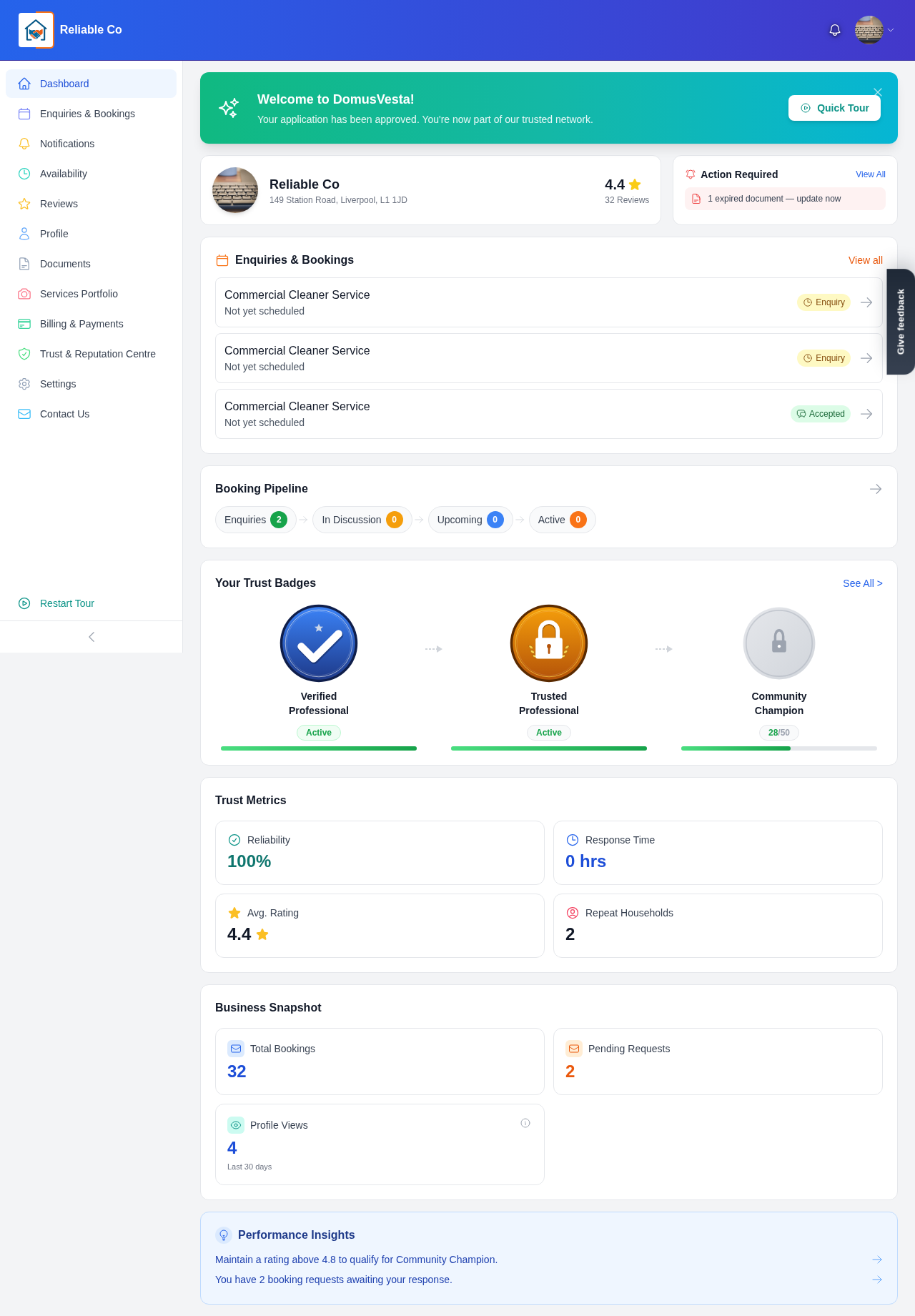
Once your profile is approved, your dashboard is the first thing you see when you log in, and it is designed to give you a clear sense of how your business is doing on DomusVesta at a glance. Rather than hunting through different screens, you get your most important numbers, your current workload and your quick links all in one welcoming view. This guide walks you through every part of it.
Getting your bearings
- Log in once you are approved. When you log in as an approved provider, your dashboard welcomes you and lays out an overview of your activity. It is built to be readable in a few seconds, so you can check in between jobs without slowing down.
- Take the guided tour. The first time you arrive, there is a short guided tour. It is well worth following, because it points out where everything lives and saves you from clicking around to learn the layout. You only see it once, so take the moment when it appears.
Reading your key numbers
Your dashboard surfaces four headline figures that, together, tell you how you are performing and where you might improve.
-
Profile views over the last 30 days. This shows how many households have looked at your profile recently. It is a great early signal of how visible you are in your area, especially while DomusVesta is still rolling out town by town.
-
Your average rating. This is the same rating households see, drawn from the reviews left after your completed jobs. A strong, steady rating is one of the biggest reasons households choose one provider over another.
-
Your typical response time. This reflects how quickly you tend to reply to enquiries. Households value a fast, friendly response, so keeping this sharp directly helps you win more work.
-
Your reliability score. This captures how dependably you follow through on the work you take on. It is one of the qualities that quietly shapes the trust households place in you.
Glancing at these four numbers regularly helps you spot trends early. If views are rising but bookings are not, for instance, it may be a nudge to sharpen your profile or respond faster.
Tracking your work and progress
-
Watch your bookings pipeline. Your dashboard shows your bookings pipeline as counts of enquiries, confirmed, in progress and completed jobs. This is the same flow you work through in detail elsewhere, summarised here so you can see your workload at a glance.
-
Check your most recent bookings. Just below, you can see your most recent bookings, giving you a quick reminder of what is current without opening every job individually.
-
Follow your trust badges and progress. Your dashboard displays your trust badges along with your progress towards the next one. This is genuinely motivating, because it shows not just what you have earned but how close you are to the next milestone, all of which is calculated from your real activity.
Using the quick links
Your dashboard is also your launchpad. Quick links take you straight to the areas you use most, so you are never more than a click from the task at hand.
-
Jump to your bookings. Go straight to your full bookings page to accept, confirm or complete work.
-
Open your services. Head to your services to review or update what you offer.
-
Manage your availability. Move quickly to your availability to adjust your hours or add an exception.
-
Review your documents. Reach your documents to keep your verification details current.
-
See your reviews. Open your reviews to read feedback and respond to households.
Making the dashboard part of your routine
The providers who get the most from DomusVesta tend to glance at their dashboard often, almost like checking the dashboard of a vehicle. A quick look tells you whether anything needs attention:
- New enquiries waiting? Use the quick link to your bookings and respond promptly.
- Response time slipping? Make a habit of replying sooner to bring it back up.
- Close to a new badge? Keep delivering good work, and let that progress bar motivate you.
Because every number here is built from your genuine activity, your dashboard rewards consistency. The best way to make it look great is simply to keep doing reliable, high-quality work and communicating well. To see how the bookings counts on your dashboard turn into real, day-to-day work, read our guide on how to manage enquiries and bookings.
Check in often, act on what you see, and your dashboard will become a trusted companion as you build your reputation with local households.
Looking for a trusted local pro?
Find a trusted how it works near you →